PotPlayer第三方皮肤主菜单黑底白字怎么办

时间:2026-02-13 21:33:42

1、点击【开始】

PotPlayer第三方皮肤主菜单黑底白字怎么办

2、点击【启动PotPlayer】打开软件。

PotPlayer第三方皮肤主菜单黑底白字怎么办

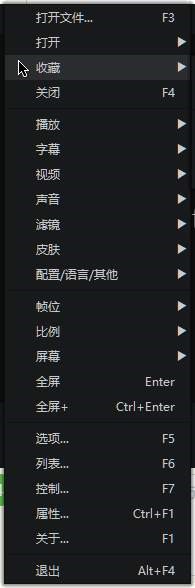
3、右键会显示黑底白字。

点击左下角【参数选项】打开设置。

PotPlayer第三方皮肤主菜单黑底白字怎么办

PotPlayer第三方皮肤主菜单黑底白字怎么办

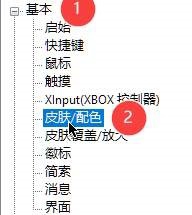
4、展开【基本】

点击【皮肤\配色】

PotPlayer第三方皮肤主菜单黑底白字怎么办

5、在弹出式菜单中选择【在皮肤中定义的第二个菜单】

PotPlayer第三方皮肤主菜单黑底白字怎么办

6、点击下方的【应用】【确定】

PotPlayer第三方皮肤主菜单黑底白字怎么办

© 2026 海能知识库
信息来自网络 所有数据仅供参考
有疑问请联系站长 site.kefu@gmail.com