系统如何关闭Application Information服务?

时间:2026-02-13 13:18:11

1、打开Windows服务工具窗口;

系统如何关闭Application Information服务?

2、在右侧窗口中找到“Application Information”服务;

系统如何关闭Application Information服务?

3、双击打开Application Information的属性对话框;

系统如何关闭Application Information服务?

4、点击对话框中的“停止”按钮;

系统如何关闭Application Information服务?

5、系统自动停止进程;

系统如何关闭Application Information服务?

6、进程停止后,对话框中自动出现“已停止”字样。

系统如何关闭Application Information服务?

1、  1、打开Windows服务工具窗口;

  2、在右侧窗口中找到“Application Information”服务;
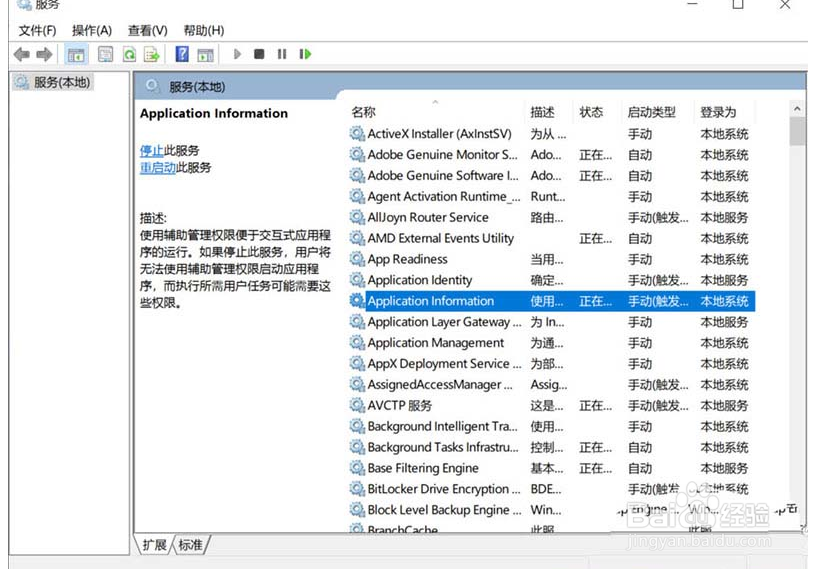
  3、双击打开Application Information的属性对话框;

  4、点击对话框中的“停止”按钮;

  5、系统自动停止进程;

  6、进程停止后,对话框中自动出现“已停止”字样。

© 2026 海能知识库
信息来自网络 所有数据仅供参考
有疑问请联系站长 site.kefu@gmail.com