1、在Pycharm中安装cx_Oracle包

2、下载与Oracle对应版本的instantclient,本人测试中下载的是(instantclient-basic-linux.x64-11.2.0.4.0)

3、解压instantclient,本人测试中解压路径为 /home/instantclient_11_2,linux命令:unzip instantclient-basic-linux.x64-11.2.0.4.0.zip

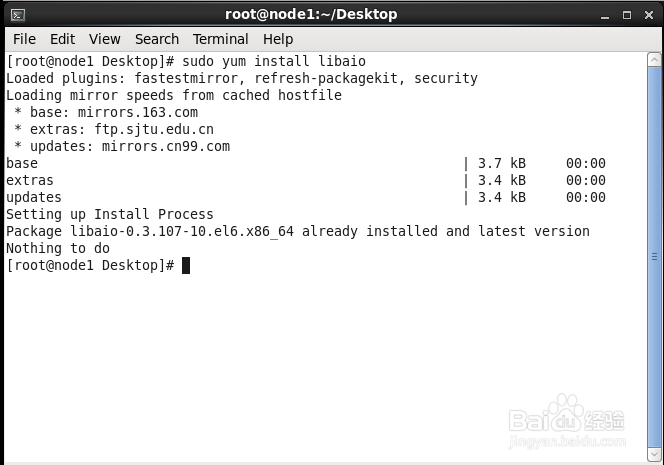
4、在linux上安装libaio包,linux命令:sudo yum install libaio
5、在linux中,添加instantclient到运行时链接路径,linux命令:
sudo sh -c "echo /opt/oracle/instantclient_12_2 > /etc/ld.so.conf.d/oracle-instantclient.conf"sudo ldconfig
6、配置文件中,配置Oracle_home,vi /etc/profile
export ORACLE_HOME=/home/instantclient_11_2
export PATH=$ORACLE_HOME:$PATH
export TNS_ADMIN=$ORACLE_HOME/network/admin
export LD_LIBRARY_PATH=$ORACLE_HOME:$LD_LIBRARY_PATH
export NLS_LANG='SIMPLIFIEDCHINESE_CHINA.AL32UTF8'
然后 source /etc/profile,使配置文件生效。

7、在instantclient_11_2目录下,创建 /network/admin文件夹,
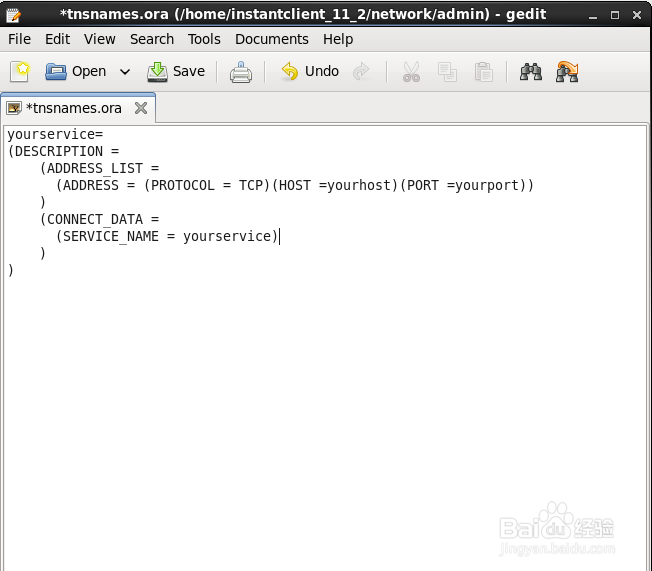
在文件夹中配置监听器 tnsnames.ora
测试中路径为:/home/instantclient_11_2/network/admin/tnsnames.ora
tnsnames.ora:
conn_oracle=
(DESCRIPTION =
(ADDRESS_LIST =
(ADDRESS = (PROTOCOL = TCP)(HOST =yourhost)(PORT =yourport))
)
(CONNECT_DATA =
(SERVICE_NAME = yourservice )
)
)
8、Python代码连接Oracle数据库
第一种写法:
import cx_Oracle
oracle_conn=cx_Oracle.connect('username/password@server:port/database')
oracle_cursor=oracle_conn.cursor()
oracle_cursor.execute('SELECT * FROM yourtables')
print(oracle_cursor.fetchall())
9、Python代码连接Oracle数据库
第二种写法:
oracle_username=username
oracle_pwd=password
host=yourhost
port=yourport
dbname=yourdatabase
dsn=cx_Oracle.makedsn(host,port,dbname)
oracle_conn=cx_Oracle.connect(oracle_username,oracle_pwd,dsn)
oracle_cursor=oracle_conn.cursor()
oracle_cursor.execute('SELECT * FROM yourtable')
print(oracle_cursor.fetchall())