1、操作系统版本为centos7.6
CentOS Linux release 7.6.1810 (Core)

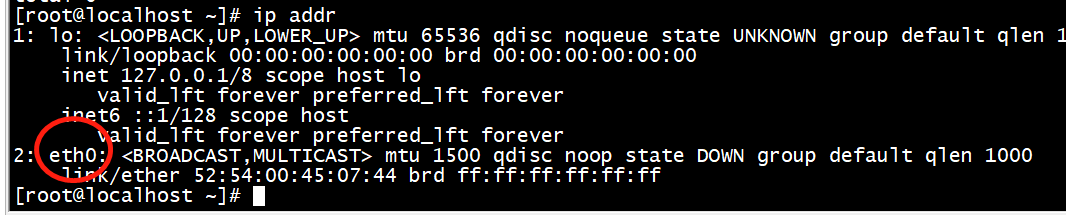
2、使用ip addr命令可以查看网卡明细,包括网卡名称等
查看到的网卡名称为eth0
3、但是通过这个命令
ll /etc/sysconfig/network-scripts/ifcfg-ens*
查询到的网卡名称不是eth0,所以才没办法获取到ip地址

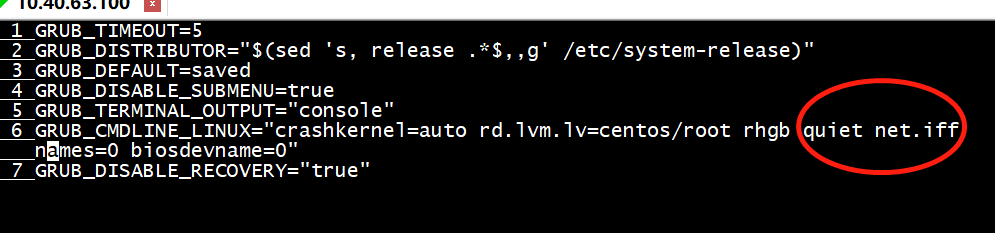
4、编辑配置文件/etc/sysconfig/grub,“root rhgb quiet”后面加入如下内容net.ifnames=0 biosdevname=0
记得不要换行
5、执行命令如下命令
grub2-mkconfig -o /boot/grub2/grub.cfg

6、修改网卡配置文件名称
[root@localhost ~]# cd /etc/sysconfig/network-scripts/
[root@localhost network-scripts]# mv ifcfg-ens3 ifcfg-eth0
[root@localhost network-scripts]#

7、替换配置文件中ens3为eth0
sed -i 's/ens3/eth0/g' ifcfg-eth0

8、重启网卡服务
systemctl restart network
