1、这里使用Ubuntu系统做一个小例子演示,登录Ubuntu系统,打开终端,输入
python3进入python交互环境

2、在交互环境,定义一个函数,具体代码如下;
>>> def test():
... print ('test')
...
>>> test
<function test at 0x7f6b36fc6ea0>
单独test
打印出的是函数的地址,函数并没有执行

3、在交互环境继续执行代码如下:
>>> def test():
... print ('test')
...
>>> test
<function test at 0x7f42187dfea0>
>>> f = test f就是test函数的地址,f()同样可以调用这个函数
>>> f()
test
这有点类似c++语言函数指针的概念,但是使用要简单很多

4、了解了上面的概念,新建一个‘test.py’文件测试闭包
vim test.py

5、在‘test.py’文件写代码如下:
1 def test(number1):
2 print ('testin start')
3 def testin():
4 print ('testin start')
5 print (number1+1)
6
7 return testin
8 test(100)

6、保存退出,运行test.py
python3 test.py
发现testin并没有运行,因为并没有调用,test返回testin函数地址

7、重新打开‘test.py’更改代码如下:
def test(number1):
print ('test start')
def testin():
print ('testin start')
print (number1+1)
return testin
a = test(100)
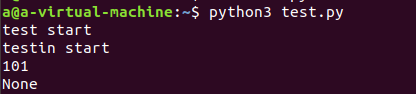
print (a())

8、保存退出,运行test.py
python3 test.py
testin也执行了