1、打开电脑上安装好的ppt软件

2、然后我们把原有的文本框删除,重新插入一个文本框并输入文字

3、接着选中文字

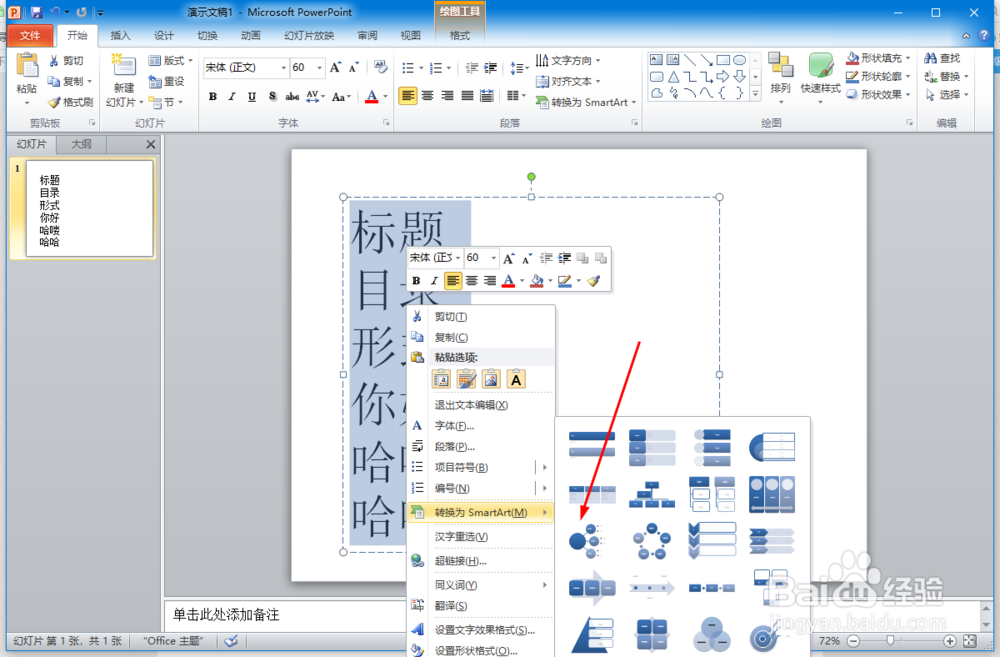
4、选中后右击找到转换为SmartArt

5、找到后把鼠标放在转换为SmartArt上出来一些图形选项,我们选中射线列表并单击
6、这样文字就转换为Smart图形了

1、打开电脑上安装好的ppt软件
2、然后我们把原有的文本框删除,重新插入一个文本框并输入文字
3、接着选中文字
4、选中后右击找到转换为SmartArt
5、找到后把鼠标放在转换为SmartArt上出来一些图形选项,我们选中射线列表并单击
6、这样文字就转换为Smart图形了